
osu! Rhythm Game: Play Online
osu! drops you into a music-powered challenge where every beat counts. Click, slide, and spin in time with songs from around the world. Your timing and accuracy shape your score—so feel the rhythm and aim for perfection!
How to play osu! in four steps
Pick a song
Click a beatmap card in the player below. The map downloads in a few seconds. No music plays until you ask for it.
Listen first if you like
Press the ▶ Preview button on a card to hear a 30-second sample of the song. Press it again to stop.
Choose a difficulty
Pick one from the list that opens on the card. New players should start with the easiest one, at the top.
Hit to the beat
Aim with the mouse and press Z, X or a mouse button when the shrinking ring meets a circle. Hold on sliders, spin on spinners, and press Space or Esc to pause.

This player needs a mouse and keyboard
The osu.net player has no touch controls. It is built for a desktop or laptop with a mouse or drawing tablet and a keyboard, so it will not be playable on most phones and tablets.
How to Play osu!
-

Start the Game
Click the 'Play' button to begin. Choose a song and difficulty to start your rhythm journey.
-

Follow the Beat
Watch for circles, sliders, and spinners. Hit them in sync with the music’s rhythm for best results.
-
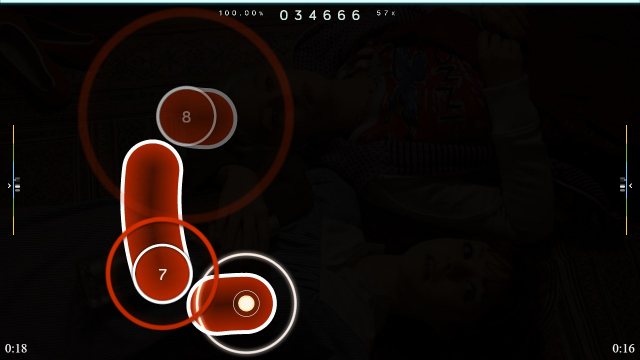
Tap Accurately
Time your clicks and movements perfectly to stay accurate. Precision is the path to better scores.
-
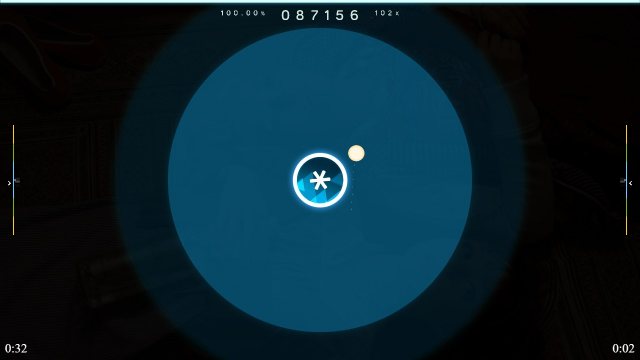
Keep the Combo
Maintain a streak by hitting consecutive beats correctly. Combos increase your score multiplier.
-
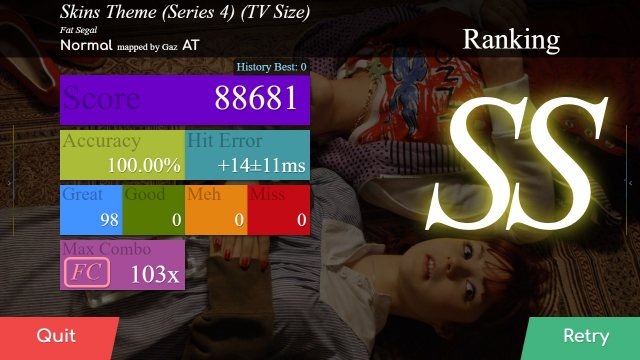
Chase High Scores
Your score depends on accuracy, timing, and streaks. Practice different maps to boost your performance.


Dive into osu! and discover a new way to experience your favorite songs.
osu! Game F.A.Q.
How do I play osu!?
Follow the rhythm cues by clicking, dragging, or spinning in sync with the music. The more precise your timing, the higher your score.
What’s the objective of osu!?
Your goal is to match your actions to the beat of each song as accurately as possible. Precision and speed are key to reaching top scores.
Can I play osu! on mobile?
Yes, osu! is available on desktop and has a mobile version under development. Some community ports also exist for touchscreen play.
How do I improve my skills in osu!?
Practice regularly, focus on timing, try various difficulty levels, and explore different songs to build consistency and reaction time.
Are there multiple game modes in osu!?
Yes! osu! features four main modes: standard, mania, taiko, and catch. Each offers a unique style of gameplay and rhythm interaction.
What happens if I miss the beat?
Missing beats lowers your accuracy and combo, reducing your score. But don’t worry—you can recover quickly and improve with practice.
Why is osu! so popular?
osu! is loved for its intense gameplay, huge song library, custom maps, and competitive rankings. It’s fun, addictive, and skill-based.
About osu! Rhythm Game
osu! is a fast-paced rhythm game where players interact with music by following beats, tapping circles, sliding along paths, and spinning to the tempo. Built around timing and accuracy, it offers a thrilling test of coordination and reaction speed.
Each song is paired with a custom beatmap, creating an experience that feels different with every track. Whether you’re into pop, electronic, classical, or video game soundtracks, osu! turns music into an active, immersive challenge.
Since its release, osu! has become a global favorite among rhythm game fans, competitive players, and content creators. Its blend of creativity and competition keeps players coming back for more.
Guides
Short, practical guides written for this player.
- How to PlayHow to Play osu! on osu.netControls, scoring, grades and a first-session walkthrough for the osu.net player.
- ModsMods in the osu.net PlayerWhat Easy, Hard Rock, Hidden, Nightcore, Daycore and Autoplay change here, and when to use them.
- SettingsSettings Guide for the osu.net PlayerEvery setting explained, with starting values and a simple way to calibrate audio offset.
- AR/OD/CS/HPAR, OD, CS and HP ExplainedApproach rate, overall difficulty, circle size and HP in plain words, with the exact numbers.
- TipsTips to Get Better at osu!Setup, aim, reading and practice routines that help you improve without strain.
- Glossaryosu! GlossaryPlain-English definitions of the terms you will see in maps and on the result screen.

